
The Art of Failing: The Importance of Embracing Failure and Trying Again


We have all heard the phrase “failure is not an option,” but in reality, failure is not only an option but also a necessary part of success. That’s right! Failure is not the antithesis of success; rather, it is a pathway to success. In today’s society, failure is often seen as a negative thing. From a young age, we are conditioned to avoid failure at all costs, and those who experience failure are often stigmatised as incompetent or inadequate. But what if we approached failure differently? What if we saw it as an opportunity to learn, grow, and try again? As Noonan (2019) indicated, experiencing failure is a normal aspect of life and is crucial for achieving success if accepted. Noonan’s work provides reassurance and confidence in embracing failure as a path to success.

The concept of embracing failure and trying again is based on the growth mindset theory developed by Carol Dweck, a psychology professor at Stanford University. According to Dweck, individuals with a growth mindset believe that their abilities can be developed and improved through hard work and dedication. They see failure as an opportunity to learn and grow, rather than a reflection of their intelligence or abilities. Studies have shown that individuals with a growth mindset are more likely to persevere through challenges and achieve their goals. They are less likely to give up after a setback or a failure and are more likely to try again and learn from their mistakes.

Furthermore, embracing failure and trying again can lead to creative breakthroughs and innovation. In his book, “The Myths of Innovation,” author Scott Berkun argues that many great inventions and discoveries were the result of multiple failures and iterations. Thomas Edison, for example, famously said, “I have not failed. I’ve just found 10,000 ways that won’t work,” referring to his numerous attempts to invent the light bulb. J.K. Rowling: The author of the wildly popular Harry Potter series faced rejection after rejection from publishers before finally landing a book deal. She could have given up after the first few rejections, but instead, she kept trying until she found success. Another great example is Michael Jordan: Considered one of the greatest basketball players of all time, Jordan was cut from his high school basketball team. Instead of letting this failure discourage him, he used it as motivation to work harder and improve his skills. How about Abraham Lincoln? Before becoming one of America’s most beloved presidents, Lincoln failed at several business ventures and lost numerous elections. Despite these setbacks, he never gave up and eventually found his way to the White House.

So, what am I trying to communicate: the importance of embracing failure and trying again cannot be overstated. Failure is not the opposite of success; it is a necessary part of the journey. When we approach failure with a growth mindset, we become more resilient, more determined, and more likely to achieve our goals. Therefore, the next time you experience a setback or a failure, remember Thomas’s, Harry’s, Michael’s, and Abraham’s stories. Don’t give up. Instead, use the experience as a learning opportunity and try again.

Remember, failure is not the end of the road; it’s an opportunity to try again, learn from our mistakes, and grow. Best wishes

Feel free to share this post on social networks.

Follow my blog for more insightful articles: http://temitopeadelekan.com

Want to submit a blog post: Share a blog post

Twitter: @taymethorpenj

Edited by Temitope Adelekan

Reference: Noonan, D. (2019). Failure found to be an essential prerequisite for success. Scientific American.

3 Ways for Small Business Owners To Improve Company-Wide Collaboration


Read more engaging articles on the Knowledge Vault today!

If you own a small business, you’re keenly aware of every employee’s role in your enterprise. What may be missing, though, are the significant gains that come from group efforts. Consider these ideas from Knowledge Vault for transforming your company culture into one where everyone works separately (or even remotely) to one that shifts from solo work to collaborative work with ease.

1. Foster a Pro-Communication Culture

It should go without saying that if you want your employees to feel comfortable sharing ideas and offering constructive critiques, you should foster an environment of open communication, non-judgmental discourse, and respect. Positivity begins with the business owners and leaders, but it’s also reinforced by your meetings, training, company policies, and feedback you give to your employees.

If your employees work in the office, do your best to create a comfortable physical environment. If your employees are remote-only or hybrid teams, ensure that they have what they need to thrive including proper office equipment and a way to communicate with everyone. This could include Slack or another popular workplace messenger app to ensure that no one gets left out of a discussion.

It’s also important that you and your team are open to hear difficult feedback from coworkers, including points like, they don’t feel heard, are not comfortable with one another, or simply don’t trust each other. You cannot address problems if you don’t know they exist, so this kind of open communication is vital, even if it is painful. Ask one another how you can gain each other’s trust, and own up to your mistakes. Never make excuses.

2. Consider Your Collaborative Platforms

The fact that life has increasingly moved online in the past decade has increased the need for high-quality virtual platforms and messaging systems. Consider the size of your entire company as well as the usual number of people in your collaborative teams to determine which platforms will suit your business.

Here are a few options that are especially suited to remote or hybrid work:

  • Zoom: you likely know and love (or hate!) this virtual meeting platform. Video calls are necessary in the age of remote work, and they can often save an employee who has to stay home with a sick child or care for an aging relative.
  • Slack: this app is essential for day-to-day communication with your office staff as well as for collaborative efforts in smaller teams. 
  • Trello: make project management easier by using a visual board to envision everyone’s duties and due dates. Everyone is able to see their personal to-do list and understand where the project is in terms of completion.
  • Workfront: collaborate in real time with this project management software that also comes with some handy automation features.

3. Keep Your Project Teams Small

LinkedIn reports that creating teams of over 15 individuals (although 10 is better) can decrease employees’ motivation to collaborate and work as a group. Too-large groups result in a few hardworking employees assigning duties to the rest of the group and picking up slack. It may also cause a phenomenon where some employees render themselves invisible by not communicating or offering any input — and letting others do the heavy lifting for them.

Make it a point to split large teams into small groups. In groups of three to eight, your employees have more incentive to speak up and work with their teammates. The Art of Teamwork recommends assigning five or six employees to a collaborative team. Employees may feel more comfortable collaborating and expressing their thoughts when working in smaller groups as well.

Finally, take the time to cultivate healthy communication practices. Company culture isn’t invented overnight. It takes time to build, and it takes into account your employees’ personalities, your leadership style, and your vision for the future. If you feel that your business isn’t as collaborative as you had wished it would be, use the tips listed here to adjust to a culture that works for everyone.

Feel free to share this post on social networks. This opinion article is for informational purposes only.

Follow my blog for more insightful articles: http://temitopeadelekan.com

Want to submit a blog post: Share a blog post

Twitter: @taymethorpenj

Brought to you by Lisa Walker

Edited by Temitope Adelekan

Time Tracking—Best Practices and Mistakes to Avoid


At first glance, tracking employee time seems pretty straightforward. Your employees simply denote the hours they were at work on a timesheet, or punch a time clock and turn their time cards in at the end of the week or month. What could go wrong? 

As it turns out, the ability to accurately track employee hours is one of the most important tasks a business undertakes. Timesheets and time cards provide invaluable data to your business regarding how efficiently you use employee time, your labour costs, and areas for productivity improvement. 

For big and small businesses alike, finding ways to make your time tracking both easier for employees and managers is essential to improving margins, accurately bidding projects, and ultimately running a more successful company. 

Time tracking trouble? 

Employers have long relied on manual timecards to track employee work hours. Employees either clock in and clock out or they’re responsible for recording and reporting how many hours they worked and when. The manual aspect makes the process vulnerable to errors, miscalculations, and estimates. 

In one 2018 survey, 44% of business owners reported that they regularly struggle with timesheet errors. An astounding 92% of the respondents reported that the errors were typically caused by the user. Some of the biggest problems are: employees forgetting to record their time, recording their time incorrectly, or recording their time to the wrong job. 

That being said, you can implement the following time tracking best practices to simplify your timekeeping and improve the accuracy of your labour costs.  

Educate employees about time tracking 

Make sure that your employees understand the importance of time tracking, as well as how your time tracking systems work and what’s expected of them. With each new employee, walk them through your time tracking tool, as well as the guidelines for how to track time. For instance, let employees know if they need to check-in to a mobile app daily (versus entering data later).

Provide them with information about how long their breaks should be, what type of personal business is permitted on the job, and how they can correct entries if they made an error. Educating your employees will not only reduce errors and misinformation but can also prevent employee time theft. 

Automate your time tracking system 

The next step to better employee time tracking is to get rid of manual timesheets and clocking in with paper time cards. Automating your record keeping provides a host of benefits, from making it easier for employees to document their work time to streamlining the record-keeping for your HR or office administrators. It also provides for 100% accurate timesheets, eliminating the need for time clock rounding.

For example, people platforms like Hourly and many others offer time tracking apps that allow employees to easily document their time when they have begun working. You can automate breaks and lunches so that they’re always included in the report and even set rules so help ensure the employees work the time they’re required—and not more or less. 

Make time tracking easy for your managers

Time tracking poses a problem for some employees, but it can also be the least favorite part of a manager or supervisor’s job. Managers routinely have to collect all employee timecards or reports, check them for accuracy regarding billable time worked, overtime, and correct any errors. What seems like a simple task can take up hours each month or week, especially if managers have to keep track of employee time because employees aren’t good about reporting their work hours.

Time tracking software solutions not only simplify time tracking for employees, but they reduce the workload for managers as well. Your managers will be able to automate their reporting, quickly find missing information and headquarter all the employees’ time data in one place.

Avoid these 3 time tracking mistakes

It’s easy to keep doing things the same way. But when it comes to time tracking, finding small improvements and avoiding common pitfalls adds up to real savings. Sidestep these time tracking mistakes and you’ll add efficiency to your time-keeping system and improve the quality of your labour cost data. 

Not collecting enough detail about employee work hours

There is a fine line between trying to keep timecards simple and oversimplifying your data in a way that’s detrimental. For instance, employees should clock in at the beginning of each shift and clock out at the end, of course. However, that is just the basics. 

Tracking breaks, lunches and regular work hours are required by law. Properly tracking over time is also essential. That not only ensures that employees get overtime pay, but also allows your organisation to better manage its resources and reduce overtime spending. You can even track hours to specific projects, job sites, and more. 

Time tracking tools allow you to document a higher level of detail about your employee work hours. Then, you can generate practical data you can use to make smarter decisions about your labor.

Not leveraging time tracking software features

You don’t have to be a tech wizard to benefit from time tracking solutions. Time tracking platforms provide multiple, easy-to-use features that enable your company to run more efficiently, and frankly, get more from your timecard reports. For example, with time tracking apps, you can: 

  • Know who’s working in real-time
  • Have employees clock in by location 
  • Geofence jobs. The software can send you an alert if employees are not where they’re supposed to be during the workday
  • Set alerts for important issues. For example, if employees head into overtime or switch work locations

Not combining payroll, worker’s comp and time tracking solutions 

All of these things are deeply related. By incorporating them into one solution you can reduce the time you spend, and improve your compliance with labour laws as well as documentation in all three areas. Some time tracking app incorporates payroll, worker’s compensation, and time tracking into one application. Run a simple search on the web, and you will be amazed at what you find on this topic.

Also, you can simplify your paydays, running payroll for employees, contractors and freelancers with the click of a button. Integrating workers comp ensures that you and your employees are covered in case of an accident and ensures that your vital employee information is all in place. Add in time tracking and you’ve streamlined a significant component of your HR function.

Time to clock out? 

Improving your employee time tracking does not take much—and it’s well worth the effort. Explore how time tracking platforms can make time tracking easier for your employees, while also providing your company with increased efficiency, time savings, and more.

Feel free to share this post on social networks. This opinion article is for informational purposes only.

Follow my blog for more insightful articles: http://temitopeadelekan.com

Want to submit a blog post: Share a blog post

Twitter: @taymethorpenj

Brought to you by Kelly Kearsley

Edited by Temitope Adelekan

Coping Up with the New Normal at Home


http://www.temitopeadelekan.com

You may have often heard people say that change is a part of life, and one of the best things to do is to embrace it with an open mind. With the COVID-19 pandemic causing drastic changes in every aspect of your lifestyle, how are you coping up with the new normal?

Adjusting to change isn’t always easy for everyone, especially with something as drastic as the global health crisis. Wearing a mask outside, physically distancing yourself from people, filling up personal and health information forms at public places, having limited access to transportation, and so on—it will take time before you get used to these things.

Then again, the indomitable human spirit is such a powerful force that helps everyone rise above challenges, especially if it’s business survival that’s at stake. Whether you’re an employee or an entrepreneur, you can still be productive and profitable despite the coronavirus outbreak.

Here are tips to help you continue with your work or business under the new normal:

1. Choose the remote work or business setup

You’re safer working or running your business from home because you don’t need to go out and travel where you are going to be with other commuters or motorists. This reduces your chances of being exposed to the virus and getting sick. So if you have the means to stay at home, take advantage of the remote work or business setup.

You’ll need a smartphone, laptop, and desktop computer, as well as reliable Wi-Fi service, as basic productivity tools. It will also help if you create a dedicated workspace, so you feel as if you’re still in a real office.

2. Create a new normal routine

Setting up a routine offers a sense of normalcy and certainty, so it’s a good coping mechanism during this time of chaos. Your new normal routine can be as creative and flexible as you want, as long as it lets you organize your day-to-day schedule, which will help you have a proper work-life balance.

Your new normal routine can look something like this:

  • Start your day with a cup of coffee that you yourself made, instead of buying it from your favorite coffee shop near the office. Eat a healthy breakfast to fuel your mind and body for the day ahead.
  • As you begin your workday, make sure to check your inbox to know what’s happening in your team and reach out to your teammates if there’s something that needs to be discussed. Pick the online communication channel that you feel comfortable in or use video conferencing to stay connected with your colleagues or catch up over lunch.
  • Try to resist the temptation of going to bed late at night. Staying home can give you a false sense that you have enough time in your hands, but this can also disrupt your body clock and leave you feeling tired in the morning.
  • If you’re not able to go to the gym, you can work out at home on your own or with your family to make it as fun as your regular gym sessions.
  • Spend your weekends doing your family’s favorite things or having your me-time so that you can remain happy and positive.

3.  Discover new opportunities for yourself or your business

If your employment or business has been severely affected by the pandemic, this is the perfect time to reassess your options. Take a step back to help you see the bigger picture clearly. Perhaps you’re finding it a challenge to sell your products or services, which are considered non-essential during a pandemic.

What new offerings can you provide to consumers in your target market to make your business more relevant during these times? If your salary has been reduced due to limited operations in your company, perhaps you can look for a second job to make up for lost income.

Closing Message You can survive and thrive despite the challenges brought about by the pandemic. The key is to have a mindset that focuses on the things you can do and control under the new normal.

Feel free to share this post on social networks. This opinion article is for informational purposes only.

Follow my blog for more insightful articles: http://temitopeadelekan.com

Want to submit a blog post: Share a blog post

Twitter: @taymethorpenj

Brought to you by Chellsea Reyes

Edited by Temitope Adelekan

Remote Management Best Practices: How to Improve Employee Productivity


Remote-Management-Best-Practices-How-to-Improve-Employee-Productivity-03-1024x527

The so-called new normal is a worldwide phenomenon, where things as we used to know them have taken a significant shift. This piece is to help people and organizations learn to cope with the recent challenges brought about by the infamous novel coronavirus outbreak.

One of the most affected sectors is the workforce. With safety protocols being recommended by health experts, it has become necessary to implement remote management practices in many offices. The idea is to let employees stay at home or other appropriate spaces where they can still work so that there’s no need for them to travel and come into physical contact with other people.

Apart from health and safety issues, remote work is also ideal for a whole lot of other reasons. Perhaps you want to save on office building maintenance costs or help promote the concept of work-life balance among your employees. As long as your business operations can continue amidst a remote work setup, you may consider trying it out in your organization.

If it’s the first time that you’re adopting this type of work arrangement, you need to brainstorm with your team and come up with a plan that you can implement across the organization.

As a business leader or manager, your role is to make sure that your employees have a comfortable workspace, first and foremost. With a proper remote workstation, it will be easy for your staff to perform their everyday tasks with high levels of efficiency and productivity. It also gives them a well-defined area where they can focus solely on their work so that they don’t mix office responsibilities with personal life.

Telecommuting can work better for your business and your employees if you set clear expectations and guidelines for everyone. Based on the accompanying infographic below, there’s no shortage of remote work tips to help you see how other companies are doing it to improve employee productivity.


Remote-Management-Best-Practices-How-to-Improve-Employee-Productivity-01-708x5685

Feel free to share this post on social networks. This opinion article is for informational purposes only.

Follow my blog for more insightful articles: http://temitopeadelekan.com

Want to submit a blog post: Share a blog post

Twitter: @taymethorpenj


Brought to you by Manila Recruitment

Edited by Temitope Adelekan

Why use Anti-Phishing Attack Software to Ensure Cybersecurity?


Phishing

A phishing attack is a process in which an imposter or an attacker sends emails to the users at large claiming to be someone they know or belonging to a brand/ services they use. Most of these emails ask users to share their personal information such as the bank account details, credit card number and pin numbers, or other such information which can lead to identity and financial theft. The emails would also ask the users to open a link or the attached document and download a file. When the user falls prey and performs any of the said actions, the malicious virus hidden in the email will enter their computer. It will provide the attackers access to the computer and allow them to steal the information stored on it without the user’s knowledge.

Over the years, many antivirus software products, spam and malware filters have been developed to detect such emails and prevent the users from being duped. Enterprises have become a hot target for the attackers. Even if one employee in the entire organization would become a victim, the attackers could access and control the entire system of the enterprise.

Almost every enterprise has antivirus software installed along with firewalls, spam filters, and other such email security systems. Yet, a good number of phishing emails slip past the filters and end up reaching the employees. Many employees have been duped and as a result, the enterprises have suffered losses in more ways than one.

If we wonder why, the answer is quite simple. Despite the claims, the traditional antivirus software packages do not successfully detect and prevent all kinds of phishing attacks. With changing technology, attackers are creating innovative methods to slip past the security filters.

What the companies need is phishing attack software that will provide all-round protection by identifying every suspicious and fraudulent email and alerting the users. The attackers not following the old methods of sending easily detectable fake emails. Instead, they are targeting a certain section of employees with highly intelligent email techniques. It is more or less impossible for the traditional antivirus software that relies on a standard database to compare the emails to identify and detect the latest phishing attacks.

If we consider Zero Day Attack as an example, it is one of the newest phishing attacks in the market that doesn’t get detected by most software packages. On average, about 1.5 million new phishing sites and email ids are created. To keep up with the ever-increasing list of fake websites is not a solution. It takes 24-48 hours to create a signature of complex malware, while it takes less than 82 seconds for an employee to fall victim to the phishing attack.

So, we need something uses a different technique to detect fake URLs without spending hours of time on it. Only then can the employees and enterprises be saved from phishing attacks. The latest and advanced phishing attack software used artificial intelligence and machine learning algorithms to scan and recognize the hidden malicious code in the emails and alert the employees. The most common type of Zero Day attacks are-

  • Microsoft Office Marcos
    • Macros are one of the most helpful tools offered by Microsoft. With one click, the repetitive tasks can be automated, thereby saving time for the employees.
    • When the attacker sends an email attachment with an Excel or other Microsoft file, the macros are coded to install malware throughout the system.
    • Using the machine learning technology, the latest anti phishing software identifies the hidden code and alerts the users about the email be a phishing attack.
  • Malicious Links
    • Embedded links within emails make it easy for websites to share information with their customers.
    • The same feature is used by scammers. They include links that will lead the user to a fake website. The IP address and domain names are similar to the brand they impersonate making it impossible for users to detect it as fraudulent at a single glance.
    • The anti-phishing software uses computer vision technology to read the minute changes in the domain names and also checks the final page which the link leads to.
  • Infected PDFs
    • The attackers take advantage of the features offered by Adobe Acrobat to include malicious software in the PDF files and send them to their victims.
    • The phishing attack software identifies the malware and blocks the email.
  • Embedded Code
    • HTML emails allow employees to include code in the email, which will be executed when the email is opened.
    • The next-generation anti phishing software detects this hidden code and stops it from being executed.

The anti-phishing software works on any device in any location. It can be deployed throughout an enterprise within a matter of minutes.

Feel free to share this post on social networks. This opinion article is for informational purposes only.

Follow my blog for more insightful articles: http://temitopeadelekan.com

Want to submit a blog post: Share a blog post

LinkedIn connect: Temitope Adelekan

Twitter: @taymethorpenj


Brought to you by David Neeble

Edited by Temitope Adelekan

Hot Desking is the Office Trend that will Save Your Business Money! (Infographic)


GettyImages-530933176_how-does-hotdesking-work

This new office trend saves space, increases flexibility, and adds one more benefit for your employees. In concept, Hot Desking is similar to ride sharing, but for workstations.

As more and more people begin working from home, less and less office space is necessary.  Even when in office, many people prefer to take a laptop to a more comfortable location (or to a collaborative space) in order to get things done. These trends result in a majority of dedicated workstations sitting vacant for much of the time.

Hot Desking creates an efficient way to handle the flexible office, by offering workspace only where and when people actually need it. Employees schedule days where they will work remotely so that there are enough work stations for those who want to come in the office.

The capital you save through this innovation will certainly impress donors. Everyone is excited about this new trend and it’s definitely something to mention when presenting a business plan or looking for a startup loan.

The main Hot Desking strategies are known as Zone and Hoteling.

Zone: This is when specific areas are designated as work areas for teams putting together cooperative projects. These can be reserved by groups who need to work collaboratively.

Hoteling: As the name might suggest, hotelling is having individual workers reserve specific workstations for the times they need them.

In both of these main options, Hot Desking requires some pretty extensive organization. Luckily there are apps already out there that cater to precisely this business strategy. The other major issue that has to be considered when Hot Desking is cleanliness. With so many people using one terminal, germs are bound to spread. It’s important to have a plan in place to keep workstations clean, so illness doesn’t spread around the company. If you’ve seen the statistics on how dirty work computers are… well, you’ll certainly want to keep stations as clean as possible.

Ultimately, Hot Desking is a great way to add convenience and coordination to a modern office.

Check this infographic from Fundera for more information on how Hot Desking can work for you and your company.

Fundera_HotDesking_IG

Feel free to share this post on social networks. This opinion article is for informational purposes only.

Follow my blog for more insightful articles: http://temitopeadelekan.com

Want to submit a blog post: Share a blog post

LinkedIn connect: Temitope Adelekan

Twitter: @taymethorpenj


Brought to you by Fundera

Edited by Temitope Adelekan


How to remodel a store to boost sales


StoreRemodel1

In a time where more and more consumers conduct the majority of their shopping online, brick-and-mortar stores need to exploit their advantages. Physical stores can offer a cohesive branding and shopping experience that eCommerce simply can’t.

Of course, brick-and-mortar stores can’t beat the convenience of ordering products online, but they don’t have to. Consumers visit physical stores for the entire experience, rather than just buying an item. Small businesses should cater to this desire to boost sales.

Remodeling your store can be quite the undertaking, however, it will propel your brand forward and raise your bottom line. From colors to floorplans, create an enticing customer journey that will drive purchases. Learn how with the visual below:

StoreRemodel

Feel free to share on social networks. Find the buttons below this post. This opinion article is for informational purposes only.

Follow my blog for more insightful articles: http://temitopeadelekan.com

Want to submit a blog post: Share a blog post

LinkedIn connect: Temitope Adelekan

Twitter: @taymethorpenj


Brought to you by Bigrentz

Edited by Temitope Adelekan

6 Ways to Tell if Your Website Was Hacked


5

If you have the slightest suspicion that your website is hacked or has been hacked for some time, then that’s probably the case. At that point, you should act as soon as possible. Most of the times, people will complain that their browser is alerting them of the hack when they visit their site. It’s either that or the hosting provider took the site offline. This could reveal one scary truth – the hackers have invaded the site for quite some time now, and they might have done considerable damage. Ideally, you should invest in some security products to safely encrypt your website. You should do anything to avoid hackers and invasive attacks. But first, let’s take a look at how you should check whether your website’s health bar. We’ll talk about outside sources here, taking into consideration that even the most vigilant system administrator could overlook certain aspects.

  • Your browser gives you a warning

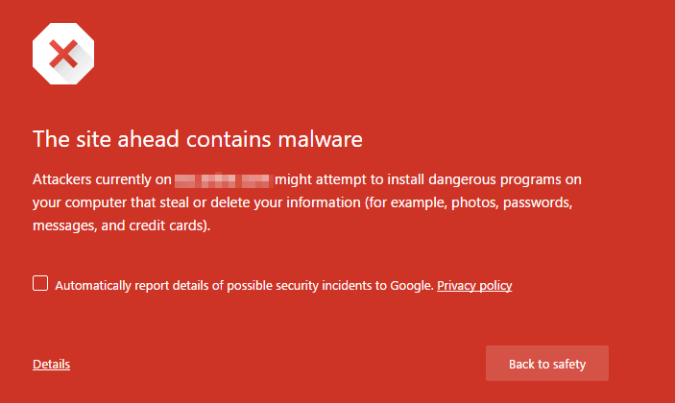
1

If you or any other visitor stumbled upon this when accessing the website on Chrome, then your site is most probably infected with a healthy dose of malware. For example, this warning tells you that your website has been used as a den for phishing attempts. Links to your website are being sent to other people, tricking them into doing what the hacker wants once they visit the website. How does the hacker achieve this? Malware.

2

The same goes for this warning. It’s self-explanatory, I think. Someone has access to your website’s internal structure, and they installed specific malware programs which infect the devices of your visitors.

  • The hosting provider takes your website offline

Your hosting provider might receive complaints from other users that your site is hacked, or their own autonomous screening programs have detected something wrong. Either way, they’ll immediately cut off your website from the internet. Keep in mind that some hosting providers might also format your server to prevent the infection from spreading to other users. It would be good to have a back-up close-by, just in case this happens. After they’ve closed down your website, you’ll usually receive a notification on your email.

  • Google search results show your website as potentially harmful

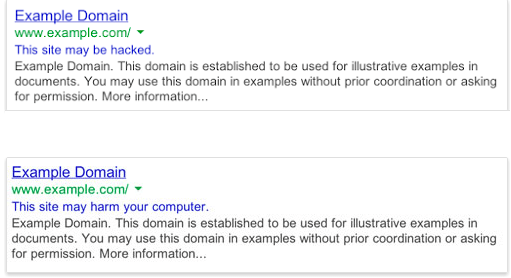
If you see this message right next to your website on the Google searches, then you’re probably dealing with hackers.

3

Sometimes, Google will remove your website from the search results altogether, if they have strong reasons to believe the malware is very risky. At times, they’ll still show it, but accompanied by a warning notification. They’ll either say that “This site may be hacked”, when they’ve noticed strange changes made to the website, or that “This site may harm your computer”, which means they’ve successfully detected the malware and they’re reminding you of this. It’s also possible for your website to display different content in different countries as part of a hack. The only way you can detect this is if you use a VPN to check your website from different countries.

  • Your Malware Scanner warns you of an infection

If you’ve been listening to me and decided to employ a malware scanner, then most likely, this is where you’ll first find out that your site is being hacked. With a malware scanner, the time between the infection and its discovery is kept to a minimum, hence its efficiency and my advice. Check your email daily, so you don’t miss any warnings when they do come.

  • Customer complaints

The truth is, your customers get to use your website way more than you do, and if you have thousands of visitors per day, this could be a very handy warning system. Quite cynical, I know, but it gets the job done. If someone informs you of fishy things related to your website, don’t wait and allow things to get out-of-hand! Take it offline if need be!

  • Google’s Search Console warns you of any infections

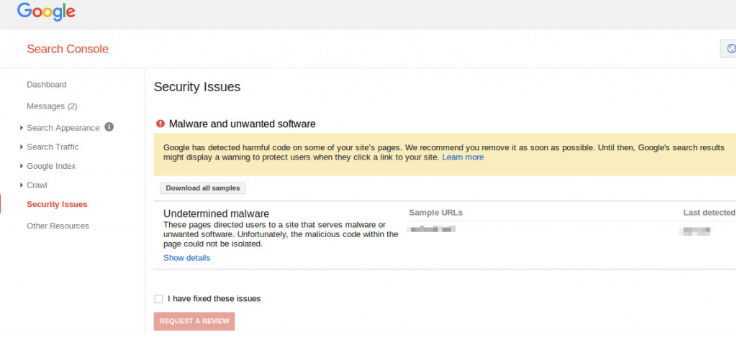
This console is the former “Google Webmaster Tools”. The name says enough, I think. Use it to check for any inconsistencies Google may have found when it’s indexing your website. It will even provide you with a few statistics with customer visits. As usual, you’ll receive the notifications by mail. So, if you see something like this, then your website is probably hacked.

4

How you can detect a hack before anyone notices

Visiting your website regularly should be your first and foremost prevention solution against malware and hacks. Just make sure to check the code and the databases regularly, and perform a couple of security checks as well. By using a Source Code Scanner, you can inspect all the PHP code and all the other source code to check for any known malware patterns. These programs will either check for any malware signatures that match their database of known infections or compare the suspicious code with a good version of it.

In this way, both old and newer types of malware can be safely detected before the infection gets to spread forth. You can also monitor the site traffic and check for any spikes. These appear when hackers use your website for a spamvertizing campaign. In plain language, they’ll include your link in spam emails which they send to people. Then, they get redirected to the true serpent hiding in the bushes. However, your website will still record a spike in traffic when the users first access the initial link. Searching for these traffic spikes with tools like Google Analytics will cut your time in half, and get you to the bottom of the issue. You’ll quickly have a general idea of whether your website has been hacked or not. Most hacked sites have these traffic spikes, so it’s quite a good hint in that direction.

Conclusion

Keeping your website malware-free is not that hard to accomplish, especially if you proactively search for any issues beforehand. Be vigilant, and you won’t be taken by surprise, that’s the golden rule. Build a routine of constant security check-ups, use Google’s Search Console, and remember to check your email daily for any warning notifications.

Feel free to share on social networks. Find the buttons below this post. This opinion article is for informational purposes only.

Follow my blog for more insightful articles: http://temitopeadelekan.com

Want to submit a blog post: Share a blog post

LinkedIn connect: Temitope Adelekan

Twitter: @taymethorpenj


Brought to you by Bogdan Patru – is a cybersecurity news analyst at VPNTeacher. He has a passion for international data policy and how it affects citizens’ privacy.

Edited by Temitope Adelekan

A Complete Guide to Using Infographics for Lead Generation


snippet

It’s no secret that lead generation is an essential cocktail in ensuring that your business will take flight. If you’re reading this article, there’s a good chance you’re thinking that you’ve already exhausted all possible efforts in attracting high-quality prospects that your brand can easily convert, but you’re still looking for creative ways to push these efforts forward. Well then, you came to the right place.

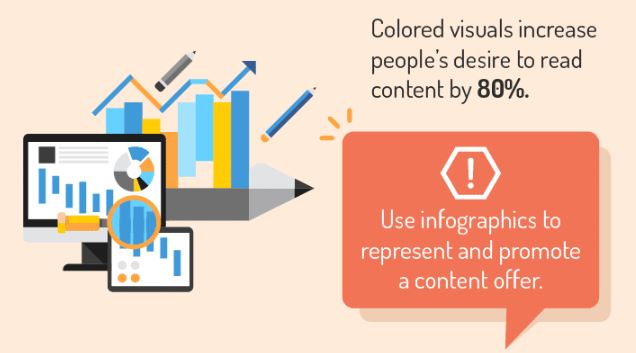
Here’s a question to start the discussion: What comes to mind when you think of infographics? Some people would say stunning graphics of visuals; others would say it’s an excellent way to get engagement. Readers are usually captivated by this content type since it combines information and aesthetic. It’s a creative way to present data without overwhelming your audience.

Infographics are so valuable to content marketers because of its proven track record in increasing site traffic and tripling social media engagement. However, it’s not often associated with lead generation—a missed opportunity.

It’s time to change this! In the infographic below, you’ll discover that it’s possible to optimize your infographics so you can reap its benefits and get quality prospects for your business. Learn how to generate leads with infographics and get ahead of the competition.

A Complete Guide to Using Infographics for Lead Generation

Feel free to share on social networks. Find the buttons below this post. This opinion article is for informational purposes only.

Follow my blog for more insightful articles: http://temitopeadelekan.com

Want to submit a blog post: Share a blog post

LinkedIn connect: Temitope Adelekan

Twitter: @taymethorpenj


Brought to you by Spiralytics

Post submitted by Ushabelle Bongo – Popularly know as Shaw is a proud daughter of the Queen City of the South who has been hustling in Makati since 2016. She initially tried her hands at banking, only to be proven once and for all that her hands are made for playing with words, not handling numbers. Now Shaw is in a better place–a digital marketing paradise otherwise known as Spiralytics, where she’s making waves as a Content Specialist.

Edited by Temitope Adelekan